Quick answer
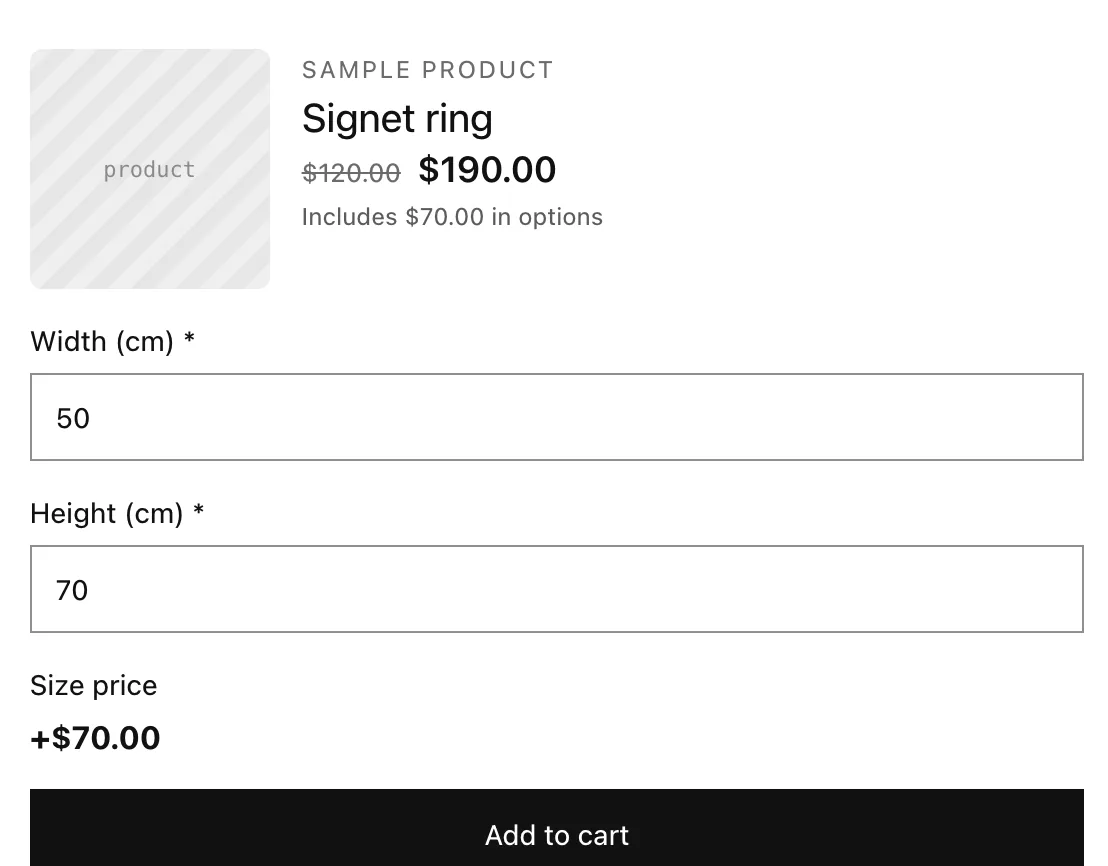
Add two required Number options, Width (cm) and Height (cm), with the sizes you can make as their limits. Then add a Price formula option with max(15, {Width (cm)} * {Height (cm)} * 0.02). A 50 × 70 cm print adds $70.00, a 20 × 20 cm print adds the $15.00 minimum, and checkout charges the same.
Last updated
You'll sell a custom-size print priced by area. The shopper types a width and a height in centimeters, and a Price formula adds 0.02 per square centimeter, with a minimum of $15. Set the product's own price to the base cost (for example the frame), since the formula is added on top.
What you’ll build
Step 1: Add the size fields
- Click Add option, choose Number. Label: “Width (cm)”. Min value 20, Max value 150, Step 1. Turn Required on.
- Add another Number: “Height (cm)”, with the same limits and Required on.
- Optional: set both to Width Half (2 per row) so they sit side by side.
Checkout keeps typed numbers inside Min value and Max value, so set them to the sizes you can make.
Step 2: Add the price formula
- Click Add option and choose Price formula. Label: “Size price”.
- In Formula, type
max(15, {Width (cm)} * {Height (cm)} * 0.02). Start typing an option name and pick it from the list to get the braces right. - Use Try it: enter 50 and 70 and check that it adds $70.00 (50 × 70 × 0.02).
max(15, {Width (cm)} * {Height (cm)} * 0.02)0.02 per cm², at least 15. Step 3: Activate and save
- Set Status to Active, apply the set to your print products and click Save.